Before we get into how to write FAQ for your website, I need you to place your hand on the nearest text (Kindles work) and repeat after me:
I will NOT phone it in with the FAQ on my website.
I will NOT treat them like an afterthought, or use them as an excuse to half-ass the rest of my website copy.
I will NOT skip them, because I want Google and potential clients to love my site.
Perfect! Now that you definitely did that (and didn’t scroll past to the next heading), let’s talk about…
What’s the point of including FAQ on your website?
There’s really three reasons:
#1 – FAQ Help Showcase Expertise
I talk about this a LOT: good website copywriting is, first and foremost, about hospitality and anticipating needs. When your website copy answers questions before readers have them (or exactly when they happen), you build more trust with those readers and they’re more likely to become clients.
#2 – It Saves You Time
If your website answers questions, you don’t have to! Also, the less back-and-forth required, the more likely people are to book.
#3 – Google Loves It
Google’s whole thing is answering questions, and people often search in the form of questions. Having question-based content on your website makes it SO easy for Google to match your answers with the people searching.
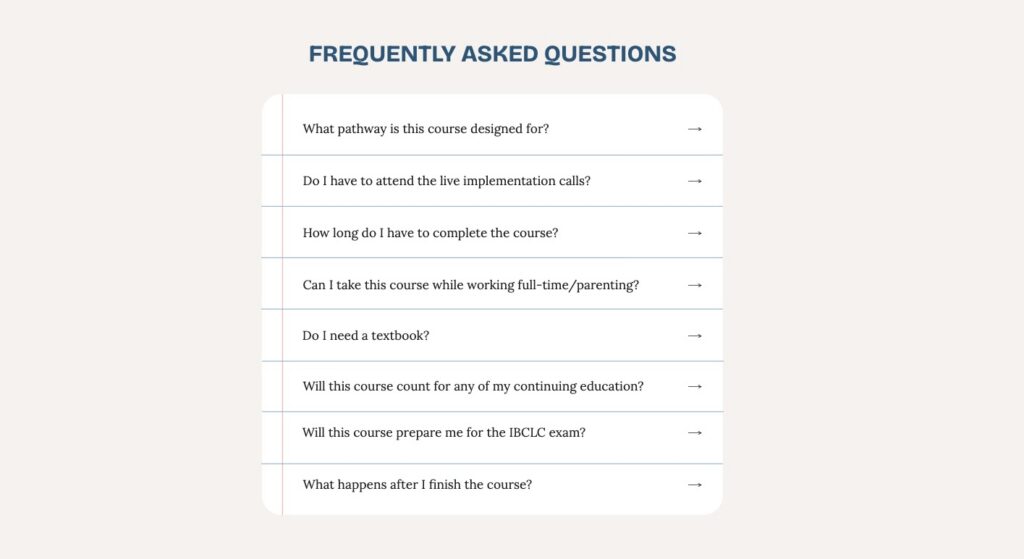
Where should FAQ live on your website?
You can (and probably should) have them in more than one place! The location of your FAQ actually determines which questions you’ll need to answer, so plan where you’ll place them first.
If you’re a service provider with one signature service (and therefore, one services page), I like to put them on the Contact page to give it more length and substance.
If you have multiple offers, you’ll likely need FAQ on each offer page. When I do this for website copy clients, I still include some general FAQ on the Contact page, with things like: timeline, availability, pricing/payment, and other questions that aren’t service-specific.
If you want to be really extra, you can also have a dedicated FAQ page – but I still recommend putting FAQ on your offer pages and linking to your FAQ page from your Contact page (and in your footer).
What to put in your FAQ
The most important thing to remember is that your FAQ is not a catch-all for questions that should have been answered elsewhere in your website, like “Why should I work with you?” and “What’s included?”
These should be questions people actually ask, and not necessarily the ones you wish they were asking (unless the answer would determine whether they’re a good fit to work with you).
I recommend getting ideas from…
Your actual clients
Specifically, questions that get asked in inquiry/contact forms, before booking, and during discovery calls.
Competitor websites*
*But take this with a grain of salt! Just because someone is technically your “competitor” doesn’t mean their website should be your example. It works somewhat for FAQ, but do NOT let me catch you looking to competitors for inspiration on the rest of your copy – you’re more original than that!
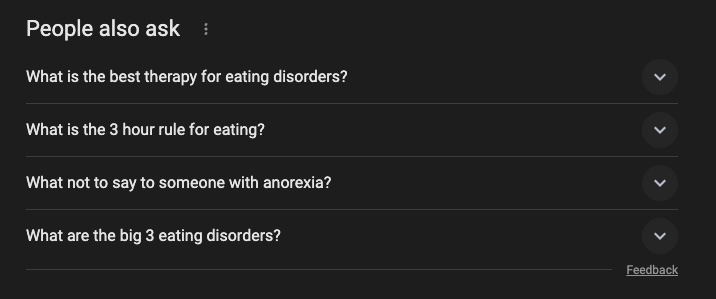
“People also ask” on Google
If you Google either the primary keyword for the page you’re working on, or just the general topic of the page, you’ll be able to scroll down and see a “people also ask” section that can help give you ideas.
How To Write FAQ
This is NOT the time to get creative or artistic with word choice (which is unfortunate, in my opinion) – FAQ are where people come for quick information, and they want it now.
Tips For Better FAQ
- Label your section or page “Frequently Asked Questions”
- Use “I” or first-person POV for questions
- Answer the question quickly & clearly
- Use your clients’ words
- Answer like you’d talk!
#1 – Label your section or page “Frequently Asked Questions.” The people looking for frequently asked questions aren’t just looking for fast information, they’re usually the website skimmers. Give them an easy way to find this section by calling it “Frequently Asked Questions” and not something like “More Info.”
#2 – Use “I” or first-person POV. Remember, people asking questions are thinking about themselves – so make it easy for them to see themselves in the question by saying “How much will MY deposit be?” or “How long will it take for ME to see results?” Because this matches how people Google their questions, it’s also good for SEO.
#3 – Answer the question quickly & clearly. When I write answers to FAQ for clients, I make sure that answers lead with a clear “yes,” “no,” or other definitive option (as long as the question is that simple). Make sure you’re actually answering the whole question (and anticipating follow-up questions) instead of linking to another page that people won’t click to.
#4 – Use your clients’ words. This goes for pretty much anything on your website, but avoid using technical terms or industry jargon that your readers won’t necessarily understand. Make sure you’re bringing your writing to their knowledge level.
#5 – Answer like you’d talk! Just because the questions and title for this section need to be straightforward doesn’t mean you can’t add your own personality to the answers. You can use these answers to provide reassurance, infuse compassion, or even make a joke if it’s on brand for you.
Want more help writing your website?
>> Grab one of my Skip The Stuck!™ website copywriting templates here to easily fill out every section you need for a high-converting website!
>> Let me help you write inside Cook Your Copy, my done-with-you website copywriting experience where you’ll get four full weeks of support from me (plus tutorials, templates, and other resources) to get it done right.