Is it okay to have a one page website?
What I quite literally always tell my clients:
A one-page website is better than no website, but it’s a better layover than a final destination.
Basically – if you’re stressed about getting a website up, just starting your business, or just need a landing page (and don’t need any Google traffic), a one-page option is a good starting place.
But in most situations, I’d recommend making the end goal adding pages to your website, so you can:
- Get more traffic through SEO (each page is a chance to focus on a new keyword and get more clicks)
- Say everything you need to say
- Say everything your readers need to hear before taking actual action
- Give people a more organized browsing experience
How To Make A One Page Website
There are three (main) things you need on your one-page website:
- A menu/navigation that lets you jump between sections.
- Main page content (keep scrolling for how to write it!)
- A footer that includes jump links to all of the main sections on your page, and to your legal/privacy policies
Showit is my FAVORITE platform for making a one-page website – it’s so easy to make jump links that just go to a specific section (this is something you need custom code for on a platform like Squarespace).
Get your first month of Showit FREE with code ‘HELLOCO’!
How To Make A One Page Website: Essential Sections
This list is organized in the order I recommend displaying it on your website (from top to bottom) for the best user experience.
Heading Section
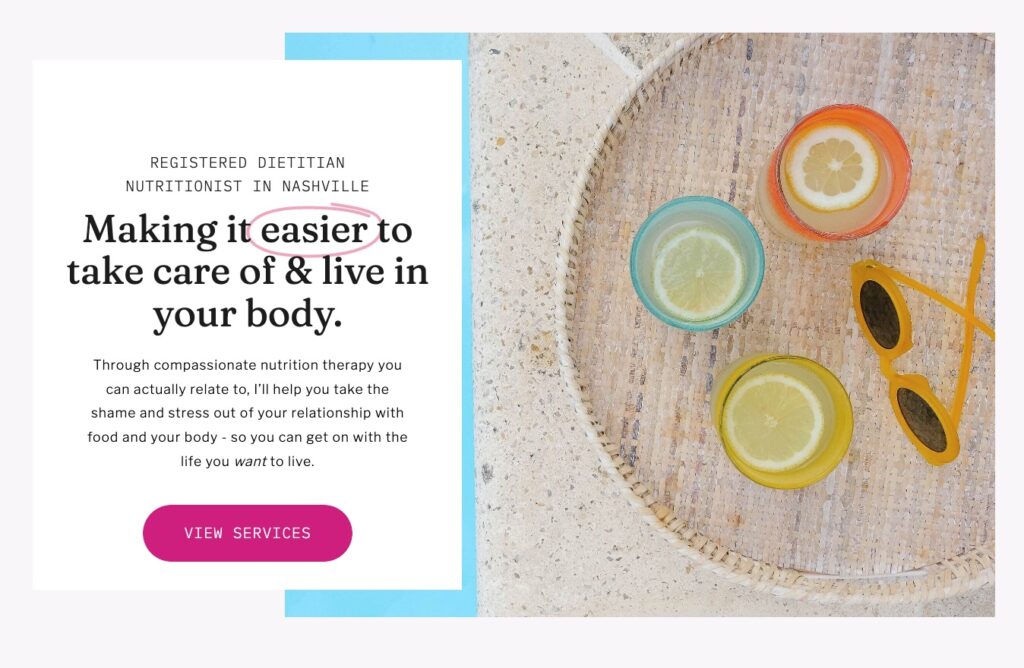
You NEED a heading section that explains what you do and who you do it for, that provides a smooth introduction into the rest of the page.
HOW TO DO IT
I recommend including a large heading, some body text, and a button that jumps to the services section of your page. Before people even scroll, they should be able to tell what you do and who you do it for.
Introduction
This section highlights a specific benefit (or the top few benefits, since you’ll only have one page to discuss) you provide to your clients, and otherwise lets readers know that they’re in the right place.
HOW TO DO IT
I like to keep this in my typical heading + optional subheading + body copy format, but a list/bullet points also works well here! Focus on how you help solve the true problem your ideal clients are having, and then transition into either your services or introducing yourself.
Bite Sized Bio
Normally, this would be a shorter introduction to you that links to your About page via a button – but for a one page website, you may want to extend your About content to ~2 sections so you can cover everything.
HOW TO DO IT
Your bite-sized bio should cover who you are, why you’re qualified, and anything else your readers need to know to build trust with you (or that you want them to know before you work together).
Services Information
On a larger website, this would be a shorter menu of your services with links to your services page(s). On a one-page website, you’ll need to condense it to all of the essential information people will want to know before reaching out.
HOW TO DO IT
For each service, include:
- Name of the service
- Who it’s right for
- What’s included
- Timeline/investment
You may also want to include a section under your services for your client process (the process of working with you).
Social Proof
Include reviews/testimonials from clients throughout this page, and consider giving them a focused section that people can flip through (like a gallery) somewhere, too. Here’s how to ask for client testimonials.
Contact Form
At the bottom of the page, include your contact form or a way to get in touch! Here’s how to create a contact form people actually fill out.
How To Make A One Page Website: Legal Policies
So, funny story –
You actually need more than one page on your one page website. Sorry! But it’ll keep you legally covered, which is way better than the few minutes it’ll take you to make these “extra” pages.
If you have a website, you NEED a privacy policy – and probably a terms of use policy, cookie policy, and some other legal sprinkles to cover your business (I’m not a lawyer, which is why I recommend a lawyer-approved policy). The best practice is to put each policy on its own page.
Need privacy policies for your website (yes, you do!)? Here you go!
Need more help with your website?
>> Download The Copy Cache, my free resource for building a word bank that’ll make writing copy easy (because you’re quite literally stealing the words straight out of your clients’ mouths).
Then, when you’re ready to expand to a multi-page website, join Cook Your Copy to learn how to write all your core website pages WITH guidance from an actual website copywriter (that’s me, btw).