

Not sure how to set up your website for the best possible SEO? Welcome to the club – and by club, I do mean the exclusive, members-only club of People Who Don’t Stress About SEO, because it really doesn’t have to be complicated. Here’s how to write metadata for your website that helps Google understand your content and gets more people to click.
Wait, what is metadata?
You know when you’re browsing a stack of books at the library (this is a common occurrence for me, so play along if it’s not for you) and you read the back of every single book to see which one you want to actually read?
That’s all metadata is.
It’s literally just an SEO-friendly title and description for each page of your website, that Google shows people who are skimming and searching so they can figure out which page they actually want to read.
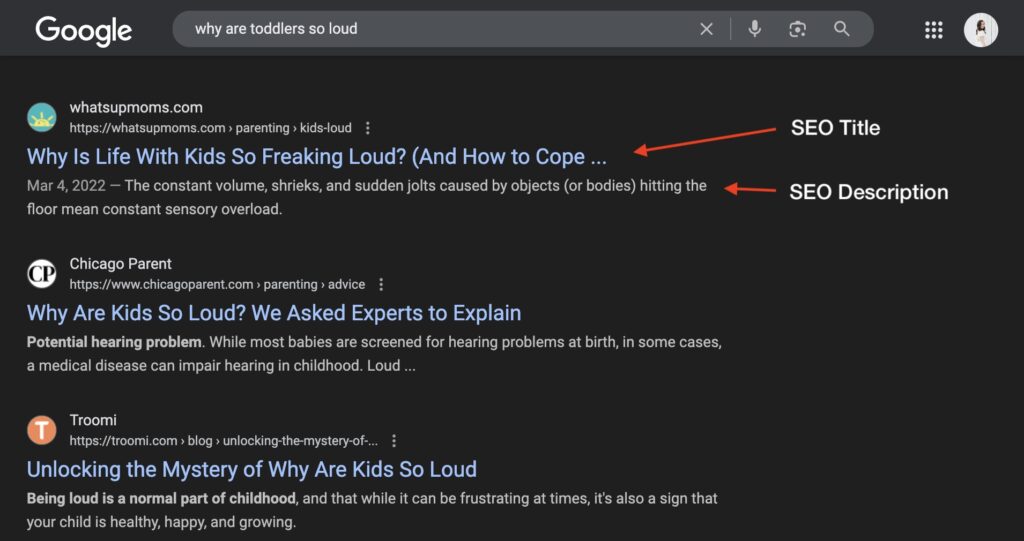
How To Write Good Metadata
Before you can write metadata for your page, you’ll need a focus keyword – click here to learn how to pick one!
After you have your focus keyword for the page, you can write your metadata!
REMINDER: ONE! KEYWORD! PER! PAGE! Do not let me catch you reusing a keyword across multiple pages – your pages will compete with each other and neither will do well).
You’ll need an SEO title and an SEO description for EACH page you’d like Google to pay attention to. Here’s how to write them:
How To Write An SEO Headline/Title
- Use your keyword, and put it as close to the beginning of your title as possible
- Title Case Your Title!
- Keep it between ~50-60 characters
- MAKE SURE IT MAKES SENSE FOR YOUR PAGE
Example SEO Title #1:
“Nutrition Counseling Services in City, State”
This would be a perfect keyword & SEO title for a services page or a homepage, because the people searching for it are likely looking to actually sign up for said nutrition counseling services. It would not make sense for a blog post, because blog readers are typically looking for information or advice — not to book an appointment right away. Make! Sure! It makes! Sense!
Example SEO Title #2:
“Showit Website Designer – Business Name”
A strong SEO title for your homepage or services page (or even your about page) — especially if you’re targeting people searching for a Showit designer or your brand directly. This one would not be a fit for blog posts or portfolio pages, which should highlight the topic or project instead.
How To Write A Meta Description
- Use your keyword, as early in the description as possible
- Write in normal case (capitalize the first letter and proper nouns, and nothing else – just like a normal sentence)
- Keep it between ~150-160 characters
- Give people an actual reason to click
- MAKE SURE IT MAKES SENSE FOR YOUR PAGE
Example Meta Description #1:
“[Business name] provides nutrition counseling services in CITY, STATE for people who want to ditch diet rules and find a healthy, empowering way of eating.”
Example Meta Description #2:
“[Your Name] is a Showit website designer who keeps things simple, smart, and scroll-stopping — so your dream clients find and book you on their own time.”
How To Install Metadata
What you actually do with your metadata depends on your specific website builder – here’s how to do it for:
- Showit
- Squarespace
- Wix
- WordPress – you’ll need a plugin! Most people use Yoast – here’s a tutorial.
How To Preview Your Metadata
If you want to see what your metadata will look like in an actual search engine results page (AKA, the SERP. AKA, the page that shows up when you Google), I love the Mangools SERP simulator!
NOTE: Google doesn’t *always* display your metadata exactly how you wrote it. It’s known to display its own version, if it thinks it can improve the metadata or make it more relevant/helpful to the reader. Your job is to give it a good foundation using the above guidelines, and to not stress if it doesn’t display exactly the way you wrote it!
How To Write Metadata: FAQ
Should I write different metadata for each website page?
Yes, because each page is different and serves a different purpose! Google loves high-quality content, and repetitive pages don’t count. Plus, you’re likely to just confuse Google, pit your pages against each other, and do well with neither.
Should I add metadata for pages I don’t necessarily want to optimize for SEO?
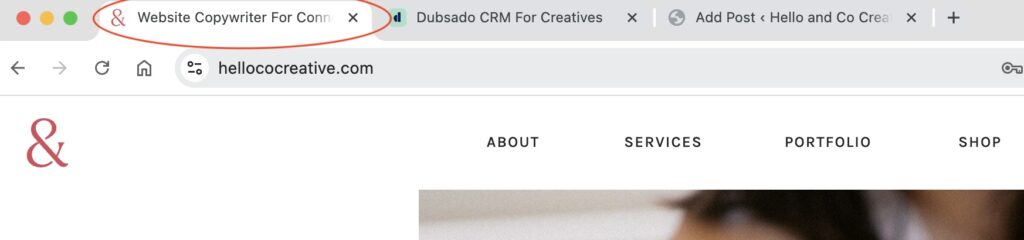
Yes! It’ll still help Google understand your website as a whole, and on some platforms (like Showit) your SEO title is also the title that displays on the tab/browser. Leaving your SEO title as the default (or worse, blank) is a quick way to make your website look way less professional than you want it to.
I don’t want to do all that – is there an easier way?
Yep, sure is! My mini SEO keyword workshop with Mckayla of Comma Mama Co. includes an AI prompt you can use to train your favorite robot to write your metadata so you don’t have to! Get it here for $97.